
What is Kleveroo?
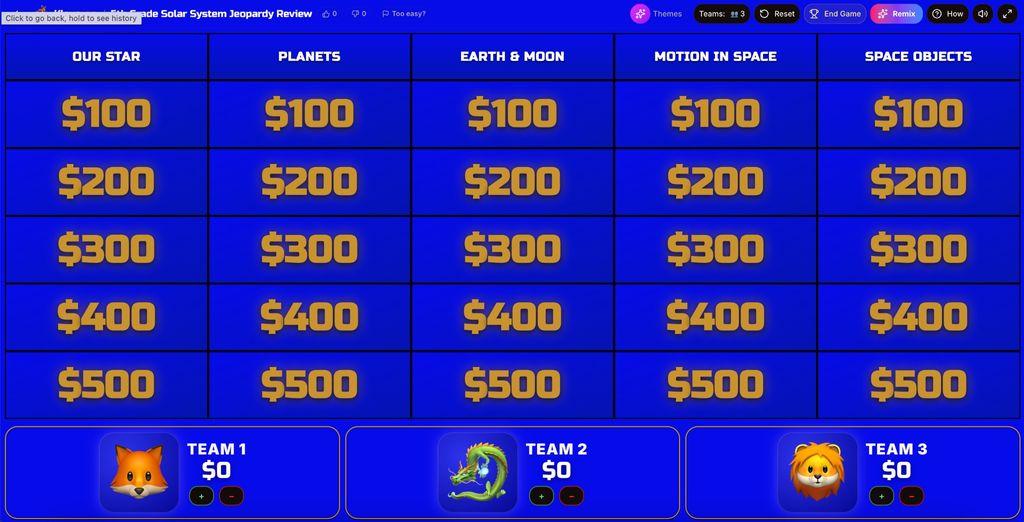
Kleveroo builds Jeopardy-style quiz boards that run in a web browser and display on a single shared screen. Teachers can start from a blank 5×5 grid and type their own categories, clues, answers and point values, or enter a topic or upload a lesson file and have the tool draft a 25-clue board to edit. A host controls the board from one TV, projector or laptop; players do not need accounts or devices, and the scoreboard, timers and played-clue tracking are built in.
A separate Live Trivia mode lets each player join a room from their own phone using a shared code, with scores updating as everyone answers. Alongside the boards, the site offers a catalogue of ready-made games across school subjects and general-knowledge topics, plus solo brain games, a daily challenge and an IQ test.
Manual board building and playing published boards are free. AI board generation gives new accounts two free generations, after which it draws on credits. Paid tiers are Kleveroo Boards at $4.99 a month and Kleveroo+ at $9.99 a month, adding more monthly AI generations, CSV uploads, private saved boards, premium themes, live trivia rooms and premium solo games. The tool was created by a founder who first made Jeopardy-style games for remote sales teams, and it is now aimed at classrooms, workplace teams, families and friends.


 Company Company | Business Name: Kleveroo HQ Location: United States Founded: 2025 |
| Age Range | 5-7, 8-10, 11-13, 14-16, 17-18, 19+ |
 Features Features | Manual Board BuilderAi Board GenerationLive Trivia RoomsBuilt-in Team ScoringReady-made Game LibrarySolo Brain Games |
 Languages Languages | English |
 Accessibility Accessibility | Moderate features |
 Policies Policies |  Terms of ServicePrivacy Policy Terms of ServicePrivacy Policy |
 Requirements Requirements | Internet - Low BandwidthInternet - High BandwidthDesktop - MacDesktop - WindowsDesktop - ChromebookDesktop - LinuxMobile - iPhoneMobile - iPadMobile - WindowsMobile - AndroidTelevision Kleveroo runs in a web browser and can be displayed on a TV, projector, laptop or any monitor for shared-screen play. Players in Live Trivia join from their own device using a shared code or link, with no app install required. No specific operating system, browser version or integrations (such as MIS, SSO or LMS) are stated. |
 Set Up Set Up | Setup takes just a few minutes. Kleveroo is browser-based, requires no software installation, LMS integration, data import, or staff training. Users can start with a ready-to-play board immediately, create a manual board, or sign up to receive 2 free AI board generations. |
 Training Training | Documentation Kleveroo is designed for self-service use and requires minimal training. Users can follow in-product guidance and written help resources to create, host, and play games. No formal onboarding or staff training is required. |
 Support Support | EmailFAQs/ForumKnowledge BaseUsers can contact Kleveroo by email for product and account support. Self-service help and guidance are also available through the site for common questions and gameplay features. |
| Home Learning | Parent Access Anyone can create the account. Kleveroo is available directly to parents and families without requiring a school or district account. Parents can use ready-to-play boards, create their own games, or generate games with AI for at-home review, family learning, and game-night activities. |
AIAI usage This product uses AI. AI-powered features AI Jeopardy-style game generation AI question and answer generation AI category generation AI board creation from a topic or prompt AI-generated classroom review content Technology type Natural Language Processing Technology used to understand or generate human language (e.g. chatbots, language analysis, speech-to-text) Generative AI AI that creates new content such as text, images, or video (e.g. AI-generated quizzes, lesson plans, dialogue simulations)  Computer Vision AI that interprets visual information from images or video (e.g. scanning student work, facial recognition, object tracking) Machine Learning Algorithms that learn from data to make predictions or decisions (e.g. adaptive learning, automated feedback) Robotics AI embedded in physical systems (e.g. programmable learning bots, interactive classroom robots) High-risk use settings Access Determination Used to make decisions about access to, or admission into, an educational programme (e.g. automated admissions systems) Behavioural Monitoring or Detection Used to analyse behaviour, emotions, or cognitive states (e.g. engagement tracking, emotion detection) Learner Evaluation Used to assess student performance or outcomes (e.g. grading, test scoring, proctoring, adaptive progression, academic placement) | |
Kleveroo PricingPricing Plans Free VersionFreemiumFree TrialPaid Subscription Kleveroo pricing starts from $4 / one-off Published tiered pricing in USD: Free ($0/forever) — free Jeopardy-style boards, basic hosting, team scoreboard, 2 free AI board generations on signup. Kleveroo Boards ($4.99/month) — 10 AI board generations/month, CSV upload, private boards, premium board themes. Kleveroo+ ($9.99/month) — 15 AI board generations/month, premium trivia packs, live trivia rooms, premium solo/arcade games, exclusive themes, priority access to new content. Extra AI board credits can be purchased on top of any paid plan.  Optimised for a quick response Optimised for a quick response | |


Compare Kleveroo with...


Kleveroo Reviews
No reviews.
This product has not received any reviews yet. Be the first!