
What is MakeLesson?
MakeLesson is an interactive exercise and assignment platform and tutor management software for private tutors and teachers.
Cut your preparation time: upload a PDF, a scan or a photo of a textbook page, paste text, or just type a topic, and get a ready interactive lesson in less than a minute, with pictures, audio and exercises.
10 exercise types: fill-in-the-blank, multiple choice, dropdown select, matching, drag-and-drop, unscramble, crossword, listening, multi-speaker dialogue and open writing. Any subject, any level, any language. Audio: 30 voices, a separate voice for each speaker.
Edit by asking: type "make exercise 2 harder" or "take it down to A2" and the lesson updates, or edit by hand for free.
Share: one link, on any phone, tablet or computer, nothing to install. Embed a lesson on a Miro board or export it as a PDF.
Cut your checking time, two ways. Instant check: students press Check and see their mistakes straight away. Homework review: answers are checked automatically, auto review suggests a rating even for open writing, and you comment, rate and finalize before the student sees it. Every submission is tracked in your dashboard.
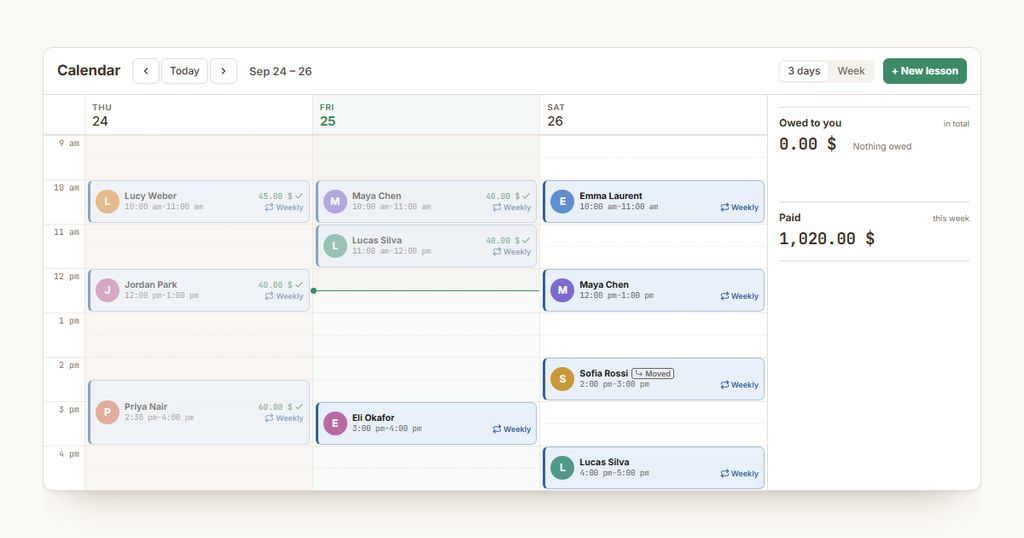
Track your schedule: one-to-one and group lessons, one-off or recurring. Drag a lesson to move it. Attach the lesson worksheet and the homework.
Telegram notifications: students get lesson reminders, lesson changes and reviewed homework; you get a message when homework is handed in.
Track payments: a price per hour for each student, one click to mark a lesson or a whole group paid, and see who has paid, who owes you and who has paid ahead, with the full payment history.
Track your income: this month, what you are owed, and the last six months.
Plans: Free, Pro $6 a month, Max $20 a month.


 Company Company | Business Name: MakeLesson HQ Location: Ukraine Founded: 2025 |
| Age Range | 5-7, 8-10, 11-13, 14-16, 17-18, 19+ |
 Features Features | Ten Interactive Exercise TypesAuto-graded Objective AnswersUpload Pdf, Photo Or TopicMobile-first DesignOne Review DashboardMiro Board EmbeddingAi Lesson GenerationPdf And Photo ConversionChat-based Lesson EditingOne-link Assignment SharingStudent Submission CollectionTeacher Review DashboardIndividual Feedback And CommentsListening And Dialogue ExercisesPdf ExportMultilingual Lesson CreationInstant Self-check For StudentsAuto Review With Suggested RatingAi-generated Pictures And AudioLesson CalendarOne-to-one And Group LessonsTutor Payment TrackerPrice Per Hour For Each StudentMonthly Income OverviewTelegram Lesson Reminders |
 Languages Languages | English, Spanish; Castilian, French, German |
 Accessibility Accessibility | Moderate features |
 Policies Policies |  Terms of ServicePrivacy PolicyGDPR Terms of ServicePrivacy PolicyGDPR |
 Requirements Requirements | Internet - Low BandwidthDesktop - MacDesktop - WindowsDesktop - ChromebookDesktop - LinuxMobile - iPhoneMobile - iPadMobile - WindowsMobile - Android Requires an internet connection and a modern web browser on any phone, tablet or computer. Nothing to install. |
 Set Up Set Up | Setup takes a few minutes. Teachers create an account and build their first lesson straight away from a topic, text, PDF, scan or photo. Nothing to install, no integration and no training needed. |
 Training Training | Documentation |
 Support Support | Email Email support is available at admin@makelesson.com. |
| Home Learning | Parent Access Anyone can create the account. Parents and home educators can create an account, build or adapt interactive lessons, share them with a child, and review submitted work. |
AIAI usage This product uses AI. AI-powered features AI lesson generation AI exercise generation AI-assisted lesson editing PDF and image content extraction Question and answer generation Difficulty and level adaptation Multilingual content generation AI-generated images Text-to-speech Multi-speaker audio generation Technology type Natural Language Processing Technology used to understand or generate human language (e.g. chatbots, language analysis, speech-to-text) Machine Learning Algorithms that learn from data to make predictions or decisions (e.g. adaptive learning, automated feedback) Generative AI AI that creates new content such as text, images, or video (e.g. AI-generated quizzes, lesson plans, dialogue simulations) Computer Vision AI that interprets visual information from images or video (e.g. scanning student work, facial recognition, object tracking)  Robotics AI embedded in physical systems (e.g. programmable learning bots, interactive classroom robots) High-risk use settings Learner Evaluation Used to assess student performance or outcomes (e.g. grading, test scoring, proctoring, adaptive progression, academic placement) Access Determination Used to make decisions about access to, or admission into, an educational programme (e.g. automated admissions systems) Behavioural Monitoring or Detection Used to analyse behaviour, emotions, or cognitive states (e.g. engagement tracking, emotion detection) | |
MakeLesson PricingPricing Plans FreemiumPaid Subscription MakeLesson pricing starts from $6 / month Plans: Free, Pro $6 a month, Max $20 a month, paid by the teacher. Students never pay.  Optimised for a quick response Optimised for a quick response | |


Compare MakeLesson with...


MakeLesson Reviews
No reviews.
This product has not received any reviews yet. Be the first!