
What is Qalami?
Marking a class set of essays takes a teacher hours, and the feedback often reaches pupils too late to help. Qalami does the first pass of that marking, and the teacher keeps the final say.
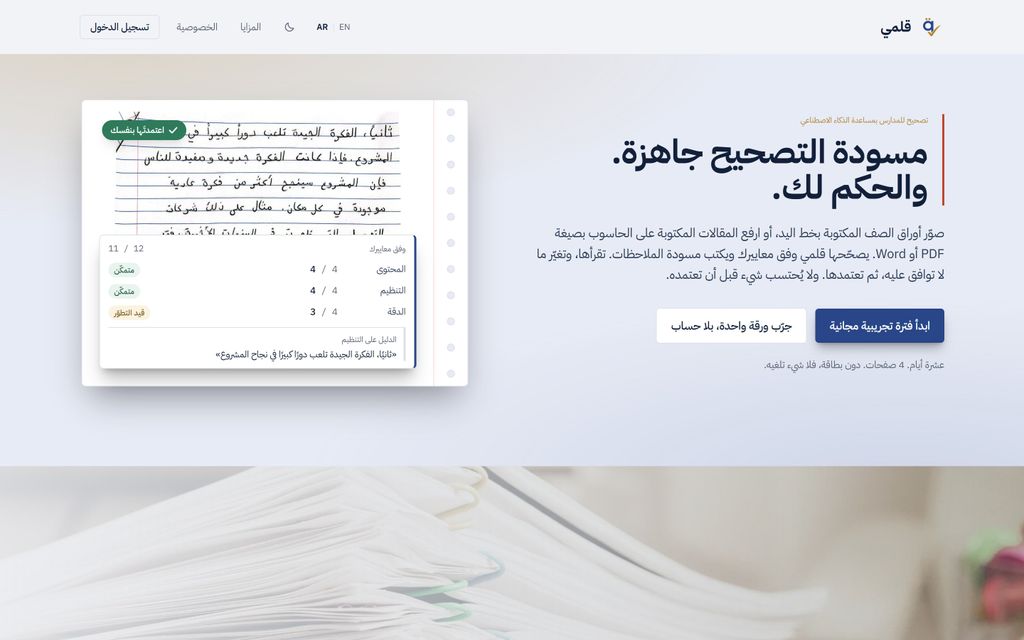
A teacher photographs or scans a class set of handwritten essays, or uploads typed work as PDF or Word files. Qalami reads the handwriting, marks each paper against the teacher’s own rubric and drafts the feedback. Every score comes with a quote from the pupil’s writing that explains it. Nothing counts until the teacher has checked it and approved it.
It reads and marks Arabic as well as English, and the whole interface works in both languages, right to left included. Rubrics can be uploaded as a Word file, a PDF or a photo, started from a template, or drafted from the task.
Around the marking: class reports that show which criteria to teach again, progress over the term, reports for families in English or Arabic, end-of-term comment drafts, and moderation and second marking for departments. Papers can come in from a phone, from Google Drive or OneDrive, or through a link pupils use to upload their own work.
Scans are deleted 90 days after approval and marks after three years, and a school can export or erase everything itself.
Qalami was built by Sophia Alnawasreh, an education content specialist who taught maths and science at a bilingual school in Kuwait, and whose mother is a vice-principal there.


 Company | Business Name: Qalami HQ Location: Bahrain Founded: 2026 |
| Age Range | 5-7, 8-10, 11-13, 14-16, 17-18, 19+ |
 Features | Mark Handwritten WorkMark Typed Essays (pdf And Word)Ai-assisted MarkingArabic And English MarkingTeacher Approval Of Every MarkEvidence Quotes For Every ScoreGive Student FeedbackRubric Upload (word, Pdf Or Photo)Rubric Generation From A TaskRubric TemplatesCustom Grade ScalesAdjustable Marking StrictnessAnonymous MarkingComment BankCopied Work DetectionOvernight Batch MarkingPhone Upload With Qr CodeStudent Upload LinksCover Sheets With Qr CodesGoogle Drive And Onedrive ImportClass Roster Import (excel/csv)Missing And Late Work TrackingClass ReportsCriteria To ReteachStudent Support GroupsWhole-class Feedback SheetsProgress Tracking Over TimeFirst And Second Draft ComparisonReports For FamiliesShare Reports On WhatsappPrintable Reports And PortfoliosParent-evening SheetsSuccess-criteria ChecklistsReflection SlipsEnd-of-term Report CommentsModerationSecond MarkingShared School Library Of Rubrics And CommentsExemplar BankSchool Usage Reports |
 Languages | Arabic, English |
 Accessibility | Moderate features |
 Policies |  Terms of ServicePrivacy PolicyGDPR |
 Requirements | Internet - Low BandwidthDesktop - MacDesktop - WindowsDesktop - ChromebookDesktop - LinuxMobile - iPhoneMobile - iPadMobile - Android Runs in any modern web browser; nothing to install. Each photographed page uploads at about 1 MB, so a class set takes longer on a slow connection, and overnight marking lets teachers leave it running. |
 Set Up | Under 10 minutes. Sign up, add a rubric and a class list, and start marking. The free trial needs no card. |
 Training | Live Online There is a guided tour inside the app. Schools can get a 30-minute setup call to load their rubric and class lists. |
 Support | Email Email support@qalamiapp.com, answered by the founder, in English or Arabic. Teachers can also report a problem from inside the app. |
| Home Learning | Teacher must create the account. Teachers send families a link to their child’s report, in English or Arabic, but parents do not use the product directly. |
AIAI usage This product uses AI. AI-powered features Handwriting Recognition Automated Marking Real-time Feedback Evidence Quotes for Each Score Rubric Generation Rubric Extraction from Documents and Photos Copied Work Detection Report Comment Drafting Whole-Class Feedback Summaries Technology type Natural Language Processing Technology used to understand or generate human language (e.g. chatbots, language analysis, speech-to-text) Generative AI AI that creates new content such as text, images, or video (e.g. AI-generated quizzes, lesson plans, dialogue simulations) Computer Vision AI that interprets visual information from images or video (e.g. scanning student work, facial recognition, object tracking)  Machine Learning Algorithms that learn from data to make predictions or decisions (e.g. adaptive learning, automated feedback) Robotics AI embedded in physical systems (e.g. programmable learning bots, interactive classroom robots) High-risk use settings Learner Evaluation Used to assess student performance or outcomes (e.g. grading, test scoring, proctoring, adaptive progression, academic placement) Access Determination Used to make decisions about access to, or admission into, an educational programme (e.g. automated admissions systems) Behavioural Monitoring or Detection Used to analyse behaviour, emotions, or cognitive states (e.g. engagement tracking, emotion detection) | |
Qalami PricingPricing Plans Free TrialPaid Subscription Qalami pricing starts from $12 / month Individual plans: Tutor $12, Teacher $24 and Plus $49 a month, by pages marked per month. Department $449 and whole school from $899; larger schools are quoted by email. Six-month and yearly terms cost less per month. Every plan includes every feature. Founding offer: up to 40% off the first year of a yearly plan, until 31 December 2026. Free trial: 10 days or 4 pages, no card.  Optimised for a quick response | |


Compare Qalami with...


Qalami Reviews
No reviews.
This product has not received any reviews yet. Be the first!