
What is spelling.live?
Spelling.Live turns a child's weekly school spelling list into focused, playful practice. It's built for UK primary children (ages 5–11, KS1 & KS2), their parents, and teachers running whole classes — in British English, aligned to the National Curriculum. You can see how it works in a two-minute interactive tour (https://spelling.live/how-it-works).
Getting words in takes seconds. Photograph the school's spelling sheet and the app reads it into a practice list — no typing. You can also paste a list, pick a built-in National Curriculum word list (Year 1–6 statutory words, KS1 common exception words), or run a free Skills Check: a feature-based spelling inventory that works out which spelling patterns a child has mastered and builds a focus list automatically.
Children practise the way they're tested. They can type, handwrite, say the word aloud, or choose from options — four spelling modes — plus spelling games that turn their own tricky words into play. Handwriting goes further than any tick: AI vision checks the spelling and the letter formation (shape, reversals, sizing, spacing), with gentle instant feedback and a low-pressure mode for children who need it.
It diagnoses, it doesn't just mark. Every mistake is matched to the spelling pattern behind it — the dropped schwa, the y-to-i rule, the silent letter — so parents and teachers see the rule to teach, not just a list of wrong words. The words behind a weak pattern become the next practice set, and spaced repetition brings tricky words back at the right moment.
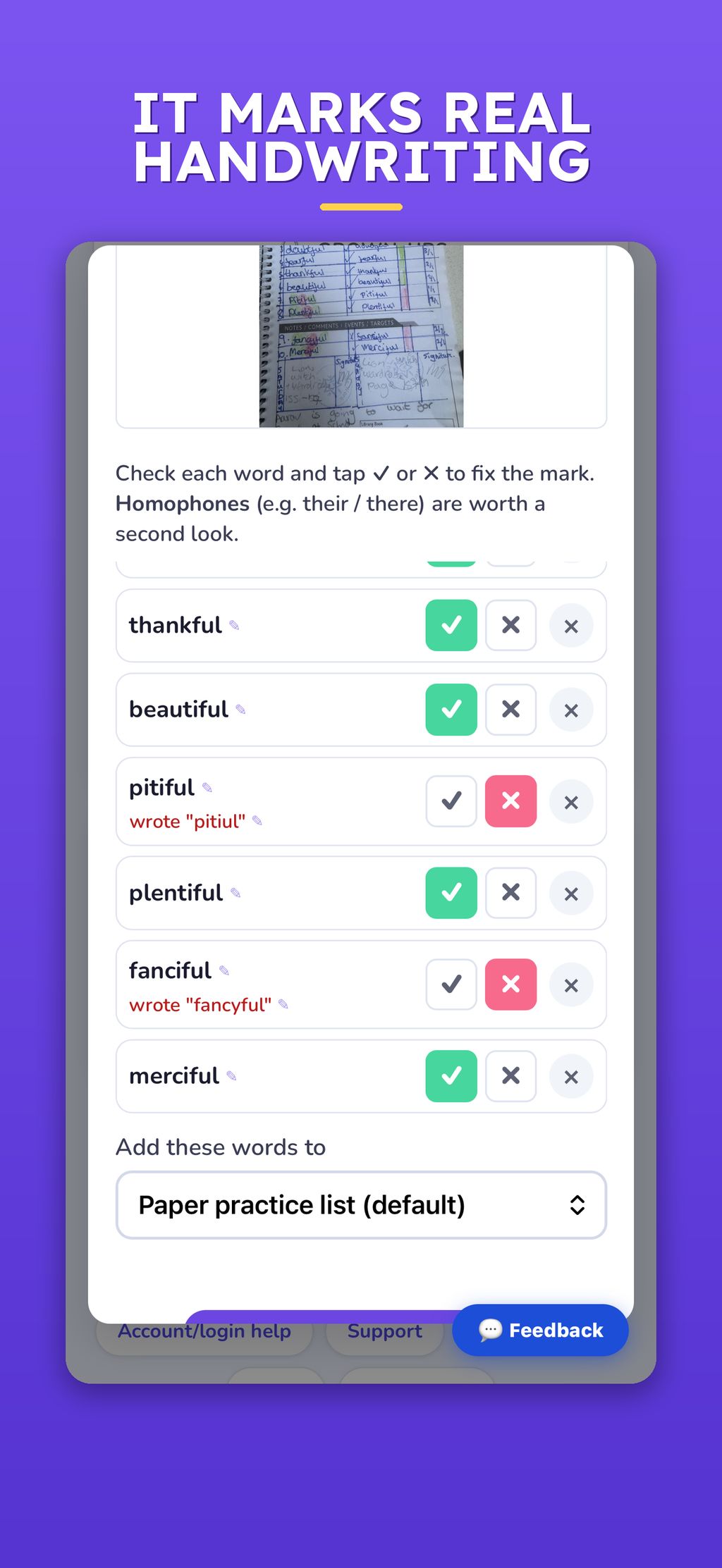
Paper and screen finally talk to each other. Photograph a marked paper test with Paper practice and the app reads the ticks and crosses, updates progress, and queues the misses. Or run a Dictation test: the app reads the words aloud, the child writes on paper, and a photo marks the page automatically.
Teachers run whole classes. Bulk upload a class roster (paste one pupil name per line) to create logins with printable QR labels; assign lists with due dates to the class or ability groups; see class accuracy, trickiest words, and who's behind. Full details in the Teachers & Classes guide (https://spelling.live/help/teachers).
Private by design. Children don't have accounts — parents do. Data is never sold, never used for advertising, and never used to train AI models. Parents can export or delete everything in one tap. Built to the UK GDPR and the ICO's Children's Code, with a published DPIA — see our privacy policy (https://spell ing.live/privacy.html). Progress tracking keeps parents in the loop with a weekly report.
Free to start, on web, iOS and Android, at spelling.live (https://spelling.liSpelling.Live turns a child’s weekly school spelling list into five minutes of playful practice a day. It’s built for primary children aged 5 to 11 (Reception to Year 6), their parents and teachers, and is aligned to the National Curriculum. Try the two-minute interactive tour (https://spelling.live/how-it-works).
Photograph the school’s spelling sheet and the app reads it in. Or paste a list, pick a built-in list (Year 1-6 statutory words, KS1 common exception words, Reception phonics, 42 phonics lists by sound, 11+), or run a free Skills Check that works out which spelling patterns a child has secured. Lists are spelled the way the child’s school spells: UK, US, Australian or Indian English.
A plan for the week. A weekly learning plan gives one short activity a day: type it, handwrite it, say it, pick it, look-hear-and-remember, word meanings, word parts, sound boxes or sentence building, plus games. Stuck? Help arrives a step at a time, not the answer. AI reads handwriting and checks letter formation, asking when unsure rather than guessing.
It diagnoses, it doesn’t just mark. Every mistake is matched to the rule behind it (the dropped schwa, the y-to-i rule, the silent letter), so you see the rule to teach. Spaced repetition brings tricky words back, and a three-week checkpoint tests practised words and new words with the same pattern. A curriculum view tracks every Appendix 1 rule, marked Secure only on unaided written spelling.
Paper and screen talk to each other. Photograph a marked paper test and the app reads the ticks and crosses. In a Dictation test the app reads the words, the child writes on paper, and a photo marks it. Or print a practice pack for a screen-free week.
Teachers run whole classes. Import a class from Google Classroom or your school MIS (via Wonde), or paste a roster, and print QR login labels; assign lists with due dates to the class or ability groups; mark a whole class’s paper test in one scan; see accuracy, trickiest words and who’s behind. Details in the Teachers & Classes guide (https://spelling.live/he lp/teachers).
Private by design. Children never need an email address. Data is never sold, used for advertising or used to train AI. Parents can export or delete it all in the app. Built to the UK GDPR and the ICO’s Children’s Code, with a published DPIA (https://spelling.live/privacy.html). Parents get a weekly plain-English progress email.
Free to start, then credit packs or the £5.99 Family plan. On web, iOS and Android at spelling.live (https://spelling.live/). Educational App Store Certified, 5.0/5.0).


 Company Company | Business Name: Spelling Live HQ Location: United Kingdom Founded: 2026 |
| Age Range | 5-7, 8-10, 11-13 |
 Features Features | Run Dictation TestsProvide Audio PronunciationRecognise HandwritingAssess Letter FormationProvide Letter-trace OverlaysAaccept Voice Spelling InputAdapt With Spaced RepetitionPersonalise Word ListsImport Word Lists From A PhotoOffer Phonics Word ListsRun A Diagnostic Skills CheckDiagnose Spelling MistakesTrack National Curriculum CoverageBuild A Weekly Learning PlanGive Step-by-step HintsRun Three-week Retention CheckpointsTeach Word Parts & Sentence BuildingShow Word Meanings & DefinitionsDisplay Visual Word HintsGamify LearningPhoto-mark Paper TestsPrint Personalised Practice PacksSupport Sen LearnersOffer Gentle Or Low-pressure ModeSupport Uk, Us, Au & Indian EnglishSupport Multiple ChildrenSend Progress Reports To ParentsSend Practice RemindersManage ClassesImport Classes (google Classroom, Wonde Mis)Create Pupil Logins In BulkPrint Qr Login LabelsAssign Lists With Due DatesAssign To Ability GroupsBulk-mark Class Paper TestsReport Pupil PerformanceRun A Class LeagueProtect Child Privacy By DesignProvide Data Export & DeletionUse Child-safe Ai Guardrails |
 Languages Languages | English |
 Accessibility Accessibility | Moderate features |
 Policies Policies |  Terms of ServicePrivacy PolicyGDPR Terms of ServicePrivacy PolicyGDPR |
 Requirements Requirements | Internet - Low BandwidthInternet - High BandwidthDesktop - MacDesktop - WindowsDesktop - ChromebookDesktop - LinuxMobile - iPhoneMobile - iPadMobile - WindowsMobile - Android spelling.live is a browser-based web app that runs on any modern browser (Chrome, Safari, Edge, Firefox) on Mac, Windows, Chromebook and Linux, plus native iOS and Android apps. An internet connection is required for audio playback, AI handwriting/voice features, and syncing progress; everyday practice works fine on modest connections. Frequently used word audio is cached for smoother playback, but the app is not designed for fully offline use. |
 Set Up Set Up | Under a minute. No installation or training — open spelling.live in any browser (or download the free app), add a child's name, and start practising. Photograph this week's spelling list and you're going. |
 Training Training | Documentation Spelling.live needs no training — it's designed to be picked up instantly by children and parents. Step-by-step help pages and how-to guides (e.g. scanning a spelling list, reading reports) are available at spelling.live/help and on our blog |
 Support Support | EmailFAQs/ForumKnowledge Base Parents get email support at support@spelling.live, plus self-serve help: a Support page, an Account & Login help page with common questions, and how-to guides on our blog (scanning spelling lists, reading progress reports, managing accounts and data). |
| Home Learning | Parent AccessParent Supervision Anyone can create the account. Yes. Parents can sign up free at spelling.live or on the iOS and Android apps, with 200 credits to start and no card needed. One parent account covers several children, each with their own profile and support settings. Parents add the weekly school list by photo or paste, get a learning plan, and receive a weekly plain-English progress email. Whoever sets up the child pays for their practice. If a school sets up its pupils, the school’s account covers it and parents pay nothing, and the school can send each pupil’s weekly progress email to their parents. Families who sign up themselves buy one-off credit packs (£4 or £20) or the Family plan, £5.99 a month for up to 4 children. |
AIAI usage This product uses AI. AI-powered features AI Handwriting Recognition Letter-Formation Scoring & Analysis Automated Paper-Test Marking (reads the marked sheet from a photo) Dictation-Test Marking from a Photo Word-List Extraction from Photos Speech-to-Text Spelling Input AI Phonics / "Sound-It-Out" Generation Real-Time Spelling Feedback AI-Generated Meaning & Spelling Hints Adaptive Practice / Spaced Repetition (tricky words resurface automatically) Technology type Natural Language Processing Technology used to understand or generate human language (e.g. chatbots, language analysis, speech-to-text) Generative AI AI that creates new content such as text, images, or video (e.g. AI-generated quizzes, lesson plans, dialogue simulations) Computer Vision AI that interprets visual information from images or video (e.g. scanning student work, facial recognition, object tracking)  Machine Learning Algorithms that learn from data to make predictions or decisions (e.g. adaptive learning, automated feedback) Robotics AI embedded in physical systems (e.g. programmable learning bots, interactive classroom robots) High-risk use settings Learner Evaluation Used to assess student performance or outcomes (e.g. grading, test scoring, proctoring, adaptive progression, academic placement) Access Determination Used to make decisions about access to, or admission into, an educational programme (e.g. automated admissions systems) Behavioural Monitoring or Detection Used to analyse behaviour, emotions, or cognitive states (e.g. engagement tracking, emotion detection) | |
spelling.live PricingPricing Plans Free TrialPaid SubscriptionOne-Off Fee Free to start: 200 credits on sign-up, no card needed. A credit is roughly one word practised, and the free credits are a trial allowance, not a time limit. Families then choose: Credit packs, one-off with no subscription: 400 credits for £4 or 5,000 credits for £20, each lasting 12 months. The Family plan: £5.99 a month, with practice free for up to 4 children and no credits needed. Cancel any time. Group pricing for schools and tutors: a free one-class pilot for schools, and a tutor account with a monthly credit allowance for tutors. The 5,000-credit pack (0.4p a word) suits a whole class. Whole-school pricing is available on request at spelling.live/quote. When a school sets up its pupils, the school’s account covers their practice and parents pay nothing. Full details at spelling.live/credits, or email support@spelling.live.  Optimised for a quick response Optimised for a quick response | |


Compare spelling.live with...


spelling.live Reviews
No reviews.
This product has not received any reviews yet. Be the first!