
What is VFF Teaching Studio?
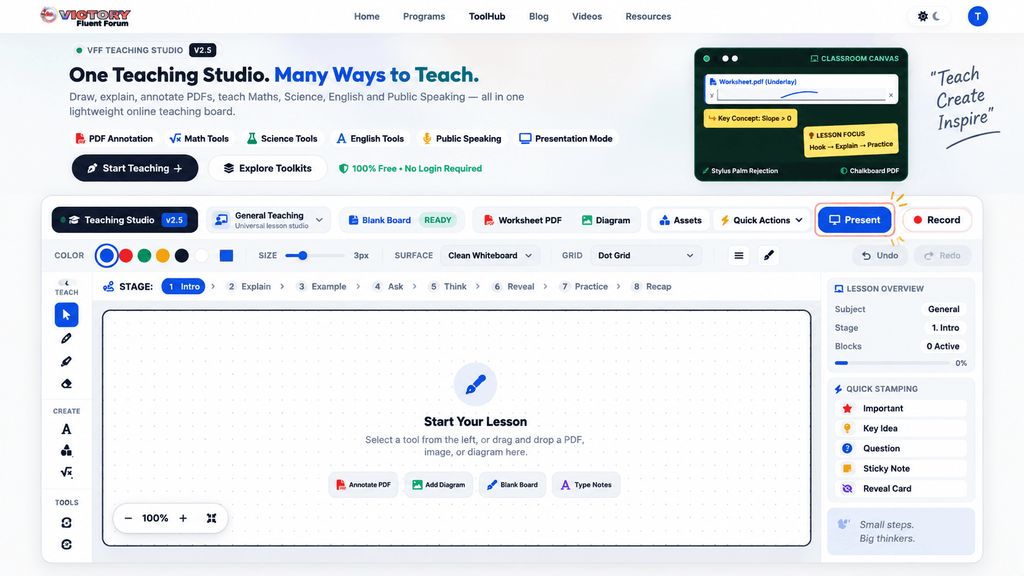
Teachers open a blank board, upload a PDF worksheet, or import a diagram, then annotate and explain over the top with freehand tools, shapes, and typed notes. The canvas can be switched between surfaces such as a green chalkboard, cream paper, dot grid, graph paper, a coordinate plane, or ruled lines, and lessons can be structured through named stages from introduction to recap. Boards can be printed or saved as PDF, and the tool runs in a browser without a login.
A maths toolkit adds visualisers for number lines and fractions along with a ruler, protractor and angle tools. Subject templates cover ground in science, mathematics, English and public speaking, including a water cycle canvas, a plant cell diagram, fraction comparison bars, a vocabulary matrix and speech structure cards. Movable lesson elements such as question-and-reveal cards, sticky notes, definition cards and student practice checklists can be dragged, edited, duplicated and deleted on the board.
It is aimed at teachers, tutors and educators, and supports stylus, touch and screen-share use. The studio operates local-first. A separate, voluntary setting lets educators contribute anonymous structural signals such as tool choices and lesson stages to help develop VFF's AI, described as Project Genome; uploaded worksheets, lesson notes and student details are not shared automatically, and the choice can be changed or withdrawn at any time.
 Company Company | Business Name: Victory Fluent Forum HQ Location: India Founded: 2023 |
| Age Range | 0-4, 5-7, 8-10, 11-13, 14-16, 17-18, 19+ |
 Features Features | Annotate Pdfs And WorksheetsMultiple Board SurfacesMaths ToolkitSubject TemplatesPrint Or Save As PdfMovable Lesson Elements |
 Languages Languages | English |
 Accessibility Accessibility | Moderate features |
 Policies Policies |  Terms of ServicePrivacy PolicyGDPR Terms of ServicePrivacy PolicyGDPR |
 Requirements Requirements | Internet - Low BandwidthDesktop - MacDesktop - WindowsDesktop - ChromebookMobile - iPadMobile - Android Runs in a web browser with no login required. Described as stylus, touch and screen-share friendly, and works with uploaded PDF worksheets and images. |
 Set Up Set Up |
|
 Training Training | Live OnlineDocumentation |
 Support Support | EmailFAQs/Forum |
| Home Learning | Parent Access Anyone can create the account. |
AIAI usage This product uses AI. AI-powered features Adaptive Content Lesson structure optimization Technology type Natural Language Processing Technology used to understand or generate human language (e.g. chatbots, language analysis, speech-to-text) Machine Learning Algorithms that learn from data to make predictions or decisions (e.g. adaptive learning, automated feedback)  Computer Vision AI that interprets visual information from images or video (e.g. scanning student work, facial recognition, object tracking) Generative AI AI that creates new content such as text, images, or video (e.g. AI-generated quizzes, lesson plans, dialogue simulations) Robotics AI embedded in physical systems (e.g. programmable learning bots, interactive classroom robots) High-risk use settings Access Determination Used to make decisions about access to, or admission into, an educational programme (e.g. automated admissions systems) Behavioural Monitoring or Detection Used to analyse behaviour, emotions, or cognitive states (e.g. engagement tracking, emotion detection) Learner Evaluation Used to assess student performance or outcomes (e.g. grading, test scoring, proctoring, adaptive progression, academic placement) | |
VFF Teaching Studio PricingPricing Plans Free Version The website describes the tool as a "Free browser whiteboard for teachers and tutors" with no login required, and states that the Teaching Studio is "fully functional with all tools, surfaces, PDF underlays, and exports" regardless of data-sharing choices. No paid tiers, subscription costs, or pricing bands are mentioned anywhere in the content, so this appears to be a free tool rather than a freemium or trial-based product.  Optimised for a quick response Optimised for a quick response | |


Compare VFF Teaching Studio with...


VFF Teaching Studio Reviews
No reviews.
This product has not received any reviews yet. Be the first!